An infostealer is a type of malware designed to steal passwords, session cookies, and banking information from a device without the victim noticing. It doesn’t encrypt files, display a ransom note, or slow the computer down. It simply copies whatever it finds and sends it to an external server.
That’s why, by the time someone discovers they’ve been infected, it’s usually too late—their credentials have been circulating on dark web forums for weeks or months.
Infostealer: What It Is and Why It’s Hard to Notice It’s There
The question of what an infostealer is has a more unsettling answer than usual: it is software designed to go unnoticed. Unlike ransomware, which requires the victim to know they’ve been attacked in order to demand a ransom, the infostealer relies on the opposite. The longer it goes undetected, the more new passwords it can capture each time the user logs in to a different service.
It is usually installed through pirated software cracks, a fake browser extension, or a legitimate-looking email attachment. Once inside, it runs just once, steals whatever it can, and in many cases self-destructs.
How InfoStealer Malware Works, Step by Step
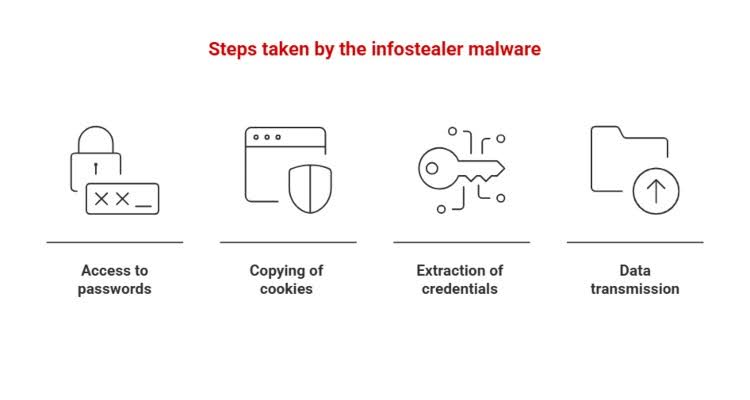
The infostealer malware follows a fairly consistent pattern, although each family (Lumma, RedLine, Vidar, and Raccoon are the most active) has its own technical variants:
- It accesses the database where the browser stores passwords and decrypts them locally.
- It copies active session cookies, allowing it to impersonate the user even if two-step verification is enabled, because that cookie already proves that the MFA has been completed.
- It extracts credentials from email clients, corporate VPNs, and cryptocurrency wallets.
- It packages everything into a file called “stealer log” and uploads it to a Telegram channel or a dark web marketplace.
That last step is crucial. Stealer logs are collected, organized by domain, and resold to other cybercriminals for months on end. A stealer log collected today may still be useful to an attacker a year from now.
Statistics that explain why infostealers have become the biggest silent threat
The figures from the latest industry reports leave little room for doubt. According to Flashpoint, infostealers stole more than 1.8 billion credentials in 2025 from 5.8 million infected devices, an 800% increase compared to the previous four months.
|
FACT |
FIGURE |
SOURCE |
|
Credentials stolen in 2025 |
+1.8 billion |
Flashpoint |
|
Bank accounts compromised in 2025 |
+1 million |
Kaspersky |
|
Stolen cards still valid as of March 2026 |
74% |
Kaspersky |
These figures paint a consistent picture. When an infostealer enters the picture, there’s almost always a larger attack behind it—whether it’s ransomware, banking fraud, or unauthorized access to corporate systems. The infostealer is rarely the final attack. It’s the gateway.
Why Passwords Are No Longer the Barrier You Think They Are
Here, it’s worth challenging a piece of advice that’s often repeated without nuance: “Change your password every three months, and you’ll be protected.” With an active infostealer, that’s not enough. If the malware steals the session cookie during the attack, the attacker doesn’t need to know the password or bypass two-factor authentication. They log in directly using the already-established session, as if they were the user themselves.
This changes the defense strategy. It’s not enough to simply react when a suspicious login alert comes in. You need to know, in advance, whether your credentials are already circulating in a log stealer, before anyone uses them. That leap separates reactive cybersecurity from continuous monitoring.
How to Protect Yourself from an Infostealer Virus, Both at Work and at Home
Some measures significantly reduce the risk, although none is foolproof on its own:
- Avoid installing pirated software, cracks, or browser extensions from dubious sources—the most common entry point.
- Use a dedicated password manager instead of saving your credentials in your browser.
- Log out of sensitive services when you’re done, rather than leaving them open indefinitely.
- Check periodically to see if your email address or passwords have appeared in any known data breaches.
For a company, however, manually checking the dark web for leaked corporate credentials is not feasible at scale. This is where Continuous Threat Exposure Management comes into play—a framework that involves constantly monitoring an organization’s actual exposure surface, rather than conducting one-off audits once a year.
Enthec operates on this approach, offering two complementary cybersecurity solutions. Kartos, designed for businesses, continuously monitors whether corporate credentials, domains, or digital assets are exposed on dark web forums and marketplaces before an attacker can use them.
Qondar, aimed at individuals, does the same at an individual level, checking whether your personal information has appeared in any keylogger logs or data breaches so you can act before falling victim to fraud.
If you manage security for an organization, or simply want to know if your data is already circulating without your knowledge, it’s worth checking what information about you or your company is currently exposed. Contact us.
Frequently Asked Questions About the Infostealer
How do I know if I have an infostealer on my computer?
It’s difficult to detect based on visible symptoms, because it doesn’t slow down the system or display any warnings. The most reliable way is to check whether your credentials have appeared in any known data breach databases or to use a monitoring service that continuously monitors the dark web.
Does a standard antivirus program detect an infostealer virus?
It can detect known variants, but many families are updated every few weeks precisely to evade the signatures of traditional antivirus software. That is why the subscription model (“malware as a service”) used by the operators of these campaigns is so effective.
Is changing my password enough if my computer has been compromised by an infostealer?
Not always. If the malware also stole the active session cookie, the attacker can continue to gain access until that session is manually closed on all devices—not just until you change your password.
What is the difference between an infostealer and ransomware?
Ransomware alerts the victim because it needs to negotiate a ransom. An infostealer, on the other hand, aims to do the opposite: go unnoticed for as long as possible so it can keep collecting data without arousing suspicion.