


Threat actors and your information security: what every person should know
We all leave a trail of information online: photos on social networks, bank details, medical records, online purchases... and, although it may seem exaggerated, this information is valuable.
So-called threat actors try to exploit this data, whether for financial gain, espionage, extortion, or even for fun. Knowing who they are, how they operate, and what tools exist to protect us is essential to keeping our digital lives safe.
Before we dive in, it is worth introducing Qondar, Enthec’s cyber surveillance tool designed specifically for individuals. It is not an antivirus or a simple ad blocker: Qondar performs Continuous Threat Exposure Management (CTEM), proactively monitoring potential leaks or risks in your digital footprint, so you can act before an incident occurs.
What is a threat actor?
A threat actor is any person, group, or organization with the intent and capability to damage other people's systems, networks, or data to gain an economic, political, or personal advantage. Simply put, it's whoever is behind a cyberattack. While we often associate them with large corporations or governments, much of their activity still affects ordinary people.
What makes someone a threat actor isn't technical skill, but the sum of three elements: intention, ability, and opportunity. If one is missing, the attack cannot occur. Therefore, the most effective protection for an individual is reducing opportunity, that is, how much of your information is exposed and accessible to anyone.
Threat actor, threat, vulnerability, and vector: they are not the same
These four terms often appear together, but they designate different things:
| Concept | What is | Example |
| Threat actor | Who attacks | A gang that steals bank credentials |
| Threat | The damage that can occur | Money stolen from your account |
| Vulnerability | The weakness that is exploited | Using the same password across multiple services |
| Attack vector | The entrance road | A fake SMS that impersonates your bank |
Understanding the difference helps you protect yourself better; you can't make threat actors disappear, but you can reduce your vulnerabilities and close entry vectors.
Types of threat actors in cybersecurity
Cybersecurity experts classify threat actors according to their motivations, resources, and methods. The lines between categories are becoming increasingly blurred. The ENISA Threat Landscape 2026 report, published in September by the European Union Agency for Cybersecurity, indicates that cybercriminals, hacktivists, and state-backed groups are increasingly sharing tools and methods, making it difficult to identify who is behind each attack.
| Type of actor | Main motivation | Resources | How it might affect you as an individual |
| Cybercriminals | Money | Medium or high | Fraud, credential theft, extortion |
| Hacktivists | Ideology or protest | Low or medium | Data leak from companies you are a customer of |
| State actors (APT) | Espionage, sabotage, influence | Very tall | Disinformation and attacks on services you use daily |
| Internal threats | Self-interest, revenge, or negligence | Variables | Data leaks from organizations that hold your data. |
| Stalkers and doxers | Control, revenge, intimidation | Lows | Public exposure of your personal data |
| Script kiddies | Notoriety or fun | Lows | Opportunistic attacks using ready-made tools |
Cybersecurity experts typically classify threat actors into several categories based on their motivations, resources, and methods. Let's look at the most common ones:
1. Cybercriminals
They seek direct financial gain and are the threat actors you are most likely to encounter. Today, they operate as an industry with divided roles. Some steal credentials with infostealers. Others sell that access, and still others exploit it through fraud or ransomware.
Their usual tools include phishing, credential theft, and selling data on the dark web.
2. Hacktivists
Motivated by political or social causes, they use cyberattacks to draw attention to a cause. They may leak confidential information from governments or companies to protest.
Their most common tactic is to saturate organizations' and companies' websites with distributed denial-of-service (DDoS) attacks, though they also leak databases as a form of protest.
3. Insiders or internal threats
These are current or former employees or collaborators who already have access to the information and use it for personal gain or revenge. This type of threat is difficult to detect because it originates from within.
4. States or groups sponsored by governments
These are state-linked groups known as APTs (Advanced Persistent Threats). They pursue espionage, sabotage, or influence, have ample resources, and can remain undetected within a system for months. They rarely target specific individuals, except for those with sensitive information such as public officials, executives, or journalists, but we all suffer the effects of their disinformation campaigns and attacks on essential services.
5. Script kiddies
These users have limited technical knowledge and launch attacks using tools created by others. Today, they are more dangerous than a few years ago because subscription-based cybercrime services and generative artificial intelligence let them carry out attacks that previously required an expert profile.
6. Stalkers and boxers
They are the most personal threat actor; someone who knows you or has chosen you as a target gathers information to intimidate, control, or expose you. Their main technique is doxing, collecting and publishing personal data without consent. They don't need advanced skills; they only need information already available on social media, search engines, and in old leaks.
How threat actors operate
Most threat actor attacks against individuals follow four phases:
- Recognition. The attacker gathers information about you from social media, search engines, public records, and past leaks. The larger your digital footprint, the easier it is for them to construct a believable deception.
- Initial access. Uses that information to gain access: a fraudulent email or SMS, a call impersonating your bank, a reused password, or a glitch in an outdated device.
- Exploitation. Once inside, the attacker steals data, installs malware, takes control of your accounts, or impersonates you to your contacts.
- Monetization. Sells your data, empty accounts, demands a ransom, or uses your identity to commit new frauds.
Most commonly used threat actor techniques
Methods change over time, but some patterns repeat themselves:
- Phishing and smishing: emails or messages that impersonate companies to steal data.
- Malware and ransomware: malicious programs that steal information or block access in exchange for a ransom.
- Brute force attacks: automated attempts to guess passwords.
- Exploitation of vulnerabilities: exploiting security flaws in software or devices.
- Social engineering: manipulating people into handing over data or performing unsafe actions.
The key is that every attack has an actor behind it with a specific motivation. And that motivation determines the chosen technique and the type of threat.
Artificial intelligence has changed the rules
AI hasn't invented new attacks, but it has made existing ones cheaper, faster, and more convincing. Messages without spelling mistakes, cloned voices, or deepfakes allow attackers to impersonate a family member or executive with unprecedented credibility.
According to Verizon's 2026 Data Breach Investigations Report, attackers already use generative AI at various stages of their campaigns, from target selection and vulnerability research to malware development. ENISA, for its part, predicts that this year AI will directly assist even more phases of attacks.
Why private individuals are also targets
Many people mistakenly believe only large corporations or public figures interest cybersecurity threat actors. The data says otherwise.
In 2025, Spain saw 45,445 online fraud cases, up 19% from 2024, and INCIBE's Cybersecurity Helpline 017 handled 142,767 inquiries. The most frequent causes included phishing, vishing, and smishing attempts (28%), fraudulent purchases (16%), and digital identity theft (14%).
There are two reasons behind these figures:
- You are a profitable target at scale. A cybercriminal doesn't need to choose you because they send thousands of messages, and even a small percentage falling for it is enough.
- You are the gateway to others. Your personal credentials can open your company email, a family member's account, or services you use.
According to Verizon's Data Breach Investigations Report 2026, which analyzed more than 22,000 confirmed breaches in 145 countries, 62% of data leaks included a human element, up from 60% the previous year.
How to protect your information from threat actors
The good news is that you can protect yourself if you take preventive measures and use the right tools.
1. Control your digital footprint
Search your name online to see what information is publicly available. Set your social media privacy settings appropriately.
You may be interested in→ How to erase or reduce your digital footprint and minimize the risk of cyberattacks.
2. Use strong and unique passwords
Avoid using the same password for everything. Learn how to manage passwords, use a password manager, and enable two-step authentication.
3. Keep your devices updated
Updates not only improve performance, but also patch security vulnerabilities.
4. Be wary of links and attachments
Before clicking on a link or opening a file, verify its source. If in doubt, it's best not to interact.
5. Use continuous threat exposure management solutions
This is where Qondar becomes an ally. This tool, developed by Enthec, continuously analyzes your digital footprint, detects whether your information appears in leaked databases or if your credentials pose a risk, and alerts you so you can act immediately.
Qondar: Your personal defense against threat actors
While many security solutions are reactive (acting only after an attack has already occurred), Qondar is proactive. Thanks to the CTEM (Continuous Threat Exposure Management) capabilities, the tool:
- Monitors continuously for possible leaks of your data.
- Identifies threats on forums, social media, the dark web, and other sources.
- Prioritizes the risks so you know what to attend to first.
- Notifies immediately when exposure is detected.
This means that it not only protects you from a targeted attack, but it also helps you reduce your exposure before threat actors can act.
Cybersecurity is not an issue exclusive to companies or governments. Every person is a potential target. While we can't prevent them, we can reduce our exposure and respond in time.
With tools like Enthec's Qondar, prevention stops being a complex task and becomes an accessible habit for anyone. Continuous threat exposure management isn't just a technical concept; it's one of the most effective ways to keep your information under control and out of reach of those who want to exploit it.
Kartos and Teron: when the threat goes beyond the individual
Many attacks against individuals begin or end within an organization. If a threat actor uses your credentials to access your company, or if a supplier is breached, Kartos lets the organization monitor its exposed surface and that of its third parties.
When you need to know who's behind a campaign, Teron, Enthec's research engine, lets intelligence teams track malicious actors, compromised infrastructure, and active campaigns from a single platform.
Start today to understand your digital footprint and protect it before it's too late.
Frequently Asked Questions
Is a threat actor the same as a hacker?
No. A hacker is someone with advanced technical knowledge they can use to defend or attack systems. A threat actor is someone who intends to cause harm, with or without technical knowledge: a phone scammer or a stalker are also threat actors.
What is an APT?
An APT (Advanced Persistent Threat) is an advanced, persistent threat actor, usually linked to a state or organized crime, that gains access to a system and stays undetected for months to spy or sabotage.
Can a threat actor attack me even if they aren't well known?
Yes. Most attacks on individuals are massive and automated: they don't target anyone specific, but anyone who falls for it. Your data can also be exposed through a data breach at a company you're a customer of, even if you did nothing wrong.
How do I know if my data is in the hands of a threat actor?
The most common red flags are unknown logins, unrecognized charges, or overly personalized messages. However, many leaks show no signs until they're used, so the most reliable way to know is to continuously monitor your exposure with a solution like Qondar.
What do I do if I discover that my data has been leaked?
Immediately change any affected passwords and any passwords you reuse, activate two-step verification, and notify your bank if any financial data is involved. If you suspect fraud or identity theft, call INCIBE at 017 and file a report.
How do you identify a threat actor?
Identifying the perpetrator of an attack, known as attribution, is a task for specialized intelligence teams. They analyze the infrastructure used, the tools employed, behavioral patterns, and activity on forums and underground markets, relying on investigative platforms like Teron.

Corporate Doxing: Information About Your Company That's Already in the Wrong Hands
Corporate doxing involves gathering and publishing information about a company, its executives, or its employees without their permission. People do it to exert pressure, extort, or prepare a targeted attack. Simply put, your information ends up in the hands of third parties without your knowledge.
By the time you find out, it's usually too late. By the time someone alerts you, phone numbers, email addresses, and even passwords have been circulating for weeks on forums that your IT team never visits. Here, you’ll learn what data is typically exposed, why a firewall doesn’t detect it, and how to monitor it.
How is corporate doxing different from regular doxing?
The classic doxing targets an individual. Corporate doxing targets an entire organization—the executive team, the finance department, or a vendor with access to your systems. INCIBE defines doxing as the disclosure of personal information on the internet without consent, usually to intimidate, harass, or extort.
In February 2026, INCIBE issued a warning about posts on doxing platforms containing information on current and former employees. In May, the National Police arrested a suspect who was disseminating information about employees of the Civil Guard and the Tax Agency.
Many people believe this affects only public agencies or large companies, but that's not always the case. Attackers target the least vigilant, not the highest-revenue targets.
What data from your company might already be exposed?
More than you might think, and almost always in places you don't control. This table summarizes the most common ones.
| Data presented | Where it usually appears | What an attacker can do |
| Corporate Credentials | Malware logs infostealer, forums, and the dark web | Gaining access to email, VPN, or cloud applications |
| Data on Executives and Employees | Past data breaches, social media, and doxing platforms | Impersonation, intimidation, or threats |
| Internal documents and code | Public repositories and misconfigured clouds | Extorting or selling information |
| Customer and Supplier Data | Data Breaches at Companies at third-party companies | Attacks on your supply chain |
| Forgotten Domains and Services | Massive Internet Scans | Finding an unguarded technical vulnerability |
Why Doesn't Antivirus Software Stop Corporate Doxing?
Because the problem occurs outside your network. Antivirus software protects your devices, and a firewall monitors your traffic. Neither of them can see what a third party posts about you on an underground forum.
Imagine that your CFO’s personal phone number and email address appear in a data breach from three years ago. An attacker cross-references this information with her professional profile and emails her, pretending to be the CEO. He asks her to make an urgent wire transfer. No system at your company has failed because the data was already out there.
That's why security that only looks inward comes too late. You also have to keep an eye on what’s out there about you.
How Can Corporate Doxing Be Stopped? Through Continuous Exposure Management (CTEM)
With a cycle that never stops. It’s called Continuous Threat Exposure Management. Instead of an annual audit, it continuously monitors what an attacker can see within your company. It has five phases:
- Scope: Determine which brands, domains, individuals, and vendors are monitored.
- Discovery: Identify which data and assets are exposed.
- Prioritization: Separate the noise from what can actually be exploited.
- Validation: Verify the threat and assess how much damage it could cause.
- Mobilization: Take action by assigning responsibilities and setting clear deadlines.
The keyword is "continuous". An annual snapshot of your exposure becomes outdated within weeks.
Kartos and Qondar: cyber surveillance for businesses and individuals
At Enthec, we offer two cyber-surveillance solutions that follow this CTEM approach.
Kartos is the solution for businesses. It scans the internet, the deep web, and the dark web for leaked data, vulnerabilities, and threats. It uses non-intrusive bots that operate 24 hours a day. It shows you what an attacker would see before they can exploit it.
Qondar extends that monitoring to individuals. It lets managers and employees know what personal data about them is circulating—which is the raw material for doxing. Together, they cover both fronts: the company and the people who make it up.
Want to know what people are saying about your organization today? Contact us.
A first step you can take today
Before signing anything, try this ten-minute exercise. Search for the name of your CEO and your company’s name as if you were a hacker. If you find a personal phone number or address, you’ll understand what corporate doxing is.
Frequently Asked Questions
How do I know if my company's data has been compromised?
Without continuous monitoring, you’ll almost never find out in time. You can start by searching for your company and its executives on search engines and public repositories. To monitor the deep web and dark web systematically, you need a cyber-monitoring tool like Kartos.
What should I do if my employees' information is published?
Notify the affected individual and change any compromised passwords as soon as possible, enabling two-step verification. Save screenshots as evidence and file a police report. Consult with your data protection officer to determine whether you need to notify the AEPD.
How does CTEM differ from a vulnerability scan?
A scan is a snapshot of your systems. CTEM is a continuous cycle that includes filtered data, third parties, and people, and that also prioritizes and validates what it finds.
Is doxing a crime in Spain?
It depends on the circumstances. Depending on how the data is obtained and used, it may constitute a crime against privacy or a crime involving the disclosure of secrets. It may also constitute a crime involving threats or harassment. Consult a criminal defense attorney.
What is the difference between Kartos and Qondar?
Kartos protects businesses, and Qondar protects people. Both continuously monitor exposure on the internet, the deep web, and the dark web.
Spanish National Security Framework: What It Is and What Your Company Is Required to Comply With
The National Security Framework is a Spanish regulation that sets minimum security requirements for systems that manage public-sector information or services. It also applies to companies that work for the public sector. If you sell services to a government agency, you will likely be required to comply with it. At Enthec, we’ll explain what it is, who it affects, and what you need to do.
What is the National Security Plan?
The ENS is the set of principles and minimum requirements for protecting government agencies’ information and electronic services. Royal Decree 311/2022, published in the Official State Gazette (BOE) on May 4, 2022, governs it and replaced Royal Decree 3/2010. The National Cryptology Center (CCN) implements it through its CCN-STIC guidelines.
Who is required to comply with the National Security Framework?
It applies to the entire public sector, as well as to private companies that provide services or solutions to a government agency. This requirement may extend to the suppliers of private companies themselves if a risk analysis warrants it.
You may be interested in: >NIS 2: How does it affect companies, and what steps should be taken to comply with the regulation?
What are the basic principles of the National Security Framework?
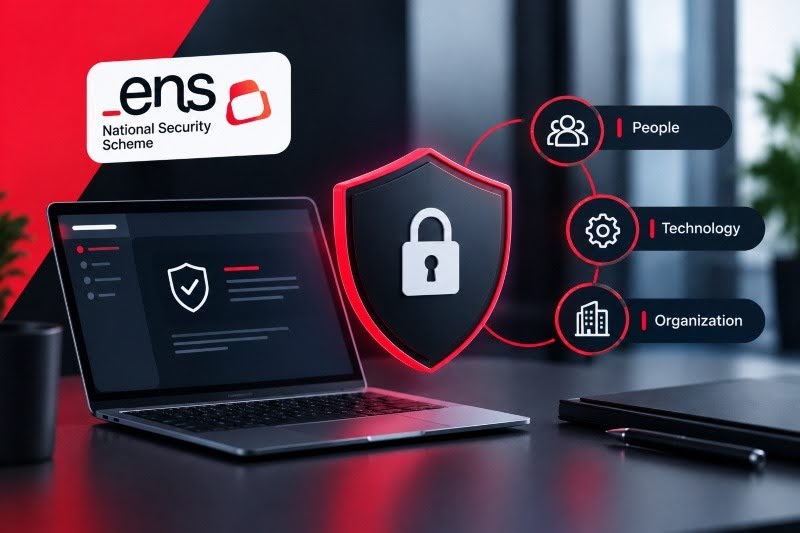
Article 5 establishes seven basic principles, which serve as a guide for everything else:
- Security as a Comprehensive Process: people, technology, and organization all at once, without ad hoc fixes.
- Risk-based management: we analyze what could go wrong and review it continuously.
- Prevention, detection, response, and maintenance: prioritize preventing incidents, detecting them, and restoring service.
- Lines of defense: multiple layers, so that if one fails, the others hold up.
- Continuous monitoring: detect anomalous behavior and respond promptly.
- Periodic reassessment: Update the measures as risks change.
- Clarification of Responsibilities.
What are the levels of the National Security Framework?
It has three system categories: basic, medium, and high. To assign a rating, assess an incident's impact across five dimensions: confidentiality, integrity, traceability, authenticity, and availability.
Each dimension is assigned a level (low, medium, or high), and the system's final rating is determined by the highest rating across the dimensions. This evaluation is reviewed periodically or whenever the system undergoes a significant change.
| Category | When it is assigned | How compliance is demonstrated |
| Basic | An incident would cause limited harm | Self-assessment and declaration of conformity |
| Media | The damage would be severe | Certification audit |
| High | The damage would be very serious | Certification audit; in the event of serious failures, service may be suspended |
What does compliance with the National Security Framework entail in practice?
It requires a security policy, a risk analysis, and the measures listed in Annex II appropriate for each category. These are the common critical issues identified in audits:
- Security Policy Approved by the company’s highest executive body.
- Distinct roles: The security team cannot report hierarchically to the IT team, except in justified cases.
- Statement of Applicability: the list of measures that apply, signed by the security officer.
- Incident Management: Private providers report incidents to INCIBE-CERT.
- Audit every two years, and an additional audit if the system undergoes substantial changes.
In June 2026, the CCN updated four guides in the 800 series and removed references to the old decree.
How is the continuous monitoring required by the ENS carried out?
Many companies treat the ENS as a test they take every two years, but the decree suggests otherwise. Article 6 excludes one-time actions, and Article 10 emphasizes continuous monitoring and ongoing asset assessment to detect vulnerabilities. Article 8 even calls for reducing the attack surface.
That is, in essence, Continuous Threat Exposure Management. It operates as a five-phase cycle: define, identify, prioritize, validate, and mobilize.
This is where Enthec's solutions come in. Kartos monitors your company from outside the perimeter. It scans the web, the deep web, and the dark web for leaked information and exposed vulnerabilities—just as an attacker would. Qondar applies the same logic to people: what data about them is circulating and what risk it poses.
Do you want to know what an attacker sees in your company before your next audit?
Frequently Asked Questions About the National Security Framework
Is the ENS mandatory for all companies?
No. It is mandatory for the public sector and for vendors that provide services to it when the contract requires it. If you do not work with government agencies, you are not required to do so, although you may adopt it as a best practice.
What is the difference between a declaration and a certificate of conformity?
A declaration is a self-assessment used for basic-level systems. Certification requires an external audit and is mandatory for intermediate and advanced levels.
How often should a system be audited?
At least every two years. If the system undergoes substantial changes, it also requires an additional audit.
Does compliance with the ENS mean compliance with the GDPR?
No. The ENS protects systems, and the GDPR protects personal data. If your system processes personal data, both apply, and the most stringent measures identified through the risk analysis take precedence.
What happens if I don’t comply with the ENS?
Most likely, you’ll be excluded from the bidding process or lose the contract, because the bid specifications require compliance. If the breach also involves personal data, the GDPR applies. Consult an advisor about your specific situation.
Importance of Personal Privacy in the Digital Age
Personal privacy in the digital age is a critical aspect that requires constant attention and proactive measures on the part of people with some online activity, asset, or information.
What is personal privacy?
Personal privacy is an individual's ability to control what personal information is shared, with whom, and under what conditions. In 2026, with daily life increasingly reliant on social media, online banking, and cloud services, protecting personal privacy is essential to preventing fraud, identity theft, and data misuse.
Maintaining personal privacy has become increasingly challenging in a world where technology and connectivity are ubiquitous. Privacy is not just about keeping information protected; it is about ensuring everyone has the right to decide how their information is used and who can access it.
National and international legislation protects individuals' privacy rights, focusing on personal online privacy. These regulations form the basis of the right to personal privacy and each person's responsibility to protect their privacy and to take the necessary steps to exercise and demand the actions needed to protect it to the level each person considers appropriate.
What is the difference between personal privacy and digital privacy?
Personal privacy is the broad right to decide what is known about you, both online and offline. Digital privacy is its application to the online environment: what traces you leave on social media, what data the applications you use collect, and what the algorithms that process this data can infer about you.
In practice, the two go hand in hand. A data breach, a fake social media profile, or an artificial intelligence algorithm that cross-references information without your consent may initially affect your digital privacy, but ultimately compromise your personal privacy in the broadest sense, impacting your reputation, your assets, and your peace of mind.
What are the characteristics of personal digital privacy?
Digital personal privacy is characterized by several key elements that must be formalized together to guarantee it in the terms set out by law.
- Data Control. People should be able to control what information is collected, how it is used, and who it is shared with. This includes access to their own data and the ability to correct inaccurate information or delete information they do not wish to share.
- Transparency. Organizations that collect data must be transparent about their practices. This involves informing users about the data collected, its purpose, and how it will be protected.
- Information security. Protecting personal data is critical to preventing unauthorized access, identity theft, and other abuses. Appropriate security measures, such as encryption and strong passwords, must be guaranteed.
- Informed consent. The individual must give explicit consent before collecting or sharing personal data. This consent must be informed, meaning the individual must clearly understand how their data will be used and the implications for their privacy.
- Right to erasure. In some cases, individuals should have the right to have their data removed from databases and systems where it is no longer needed or where consent has been withdrawn.
Concerns and crimes against the privacy of personal information in the digital age
The digital age has brought with it several concerns and crimes that affect the privacy of personal information. Some of the main problems to be addressed are:
Artificial intelligence algorithms
Artificial intelligence (AI) algorithms analyze large volumes of data to identify threats and make decisions. While this capability is beneficial in many ways, it also poses privacy risks. Algorithms can collect and analyze personal data without the user's knowledge or consent, which can lead to discrimination, privacy loss, and misuse of information.
You can learn more about this threat in risks of AI for people.

Mass privacy surveillance
Mass surveillance is the extensive collection and monitoring of data on individuals or groups by governments, corporations, or other entities. This surveillance can include data collection from telecommunications, social media, security cameras, and more.
Mass surveillance is likely to invade people's privacy and undermine trust in the institutions that collect and use this data.
Impersonation
Impersonation occurs when someone uses stolen data, such as name, ID number, email address, images, or even voice, to impersonate another person. In 2026, this threat has expanded with deepfakes that can clone voice and images from a single audio or photo source, and with SIM swapping, which hijacks the phone line to bypass two-step verification.
Scams and frauds
Online scams and frauds constantly threaten personal privacy. Cybercriminals use various tactics to trick people into giving them access to their personal and financial data, including phishing, vishing (phone scams), and smishing (text message scams).
Hate crimes
Hate crimes in the digital environment include harassment, threats, and defamation directed at individuals or groups based on characteristics such as race, religion, gender, sexual orientation, or disability. Not only do these crimes violate victims' privacy, but they also have a significant impact on their emotional and psychological well-being.
Crimes against privacy
Privacy crimes include the unauthorized disclosure of personal information, such as intimate data, images, or videos, without the person's consent. It can happen through hacks, vindictive people, or even dishonest employees with access to personal data. The consequences are often devastating, affecting the victim's reputation, personal relationships, and mental health.
How to protect personal privacy
Protecting personal privacy online requires awareness and a proactive approach. Some practical measures to implement such protection are:
- Education and awareness. Staying informed and up to date on privacy threats and best practices for protecting personal information is the first step in choosing the right protection tools and routines.
- Use of privacy tools. Using privacy tools, such as secure browsers, VPNs (Virtual Private Networks), and encryption software, designed to protect online data, helps keep online communications and activities private.
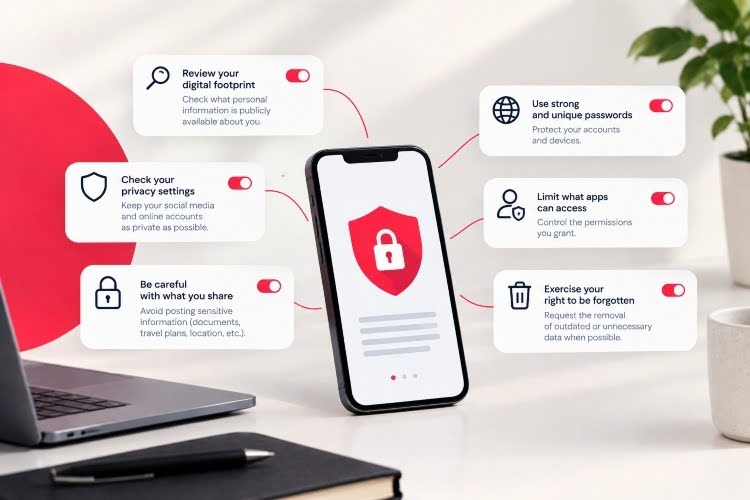
- Social media privacy settings. Adjust privacy settings on all social media accounts to limit who can see and access your personal information, and review and update them regularly. Be aware of your actual reach and the nature of your account (professional versus personal) and adjust the information you share and your privacy settings accordingly.
- Secure passwords and multi-factor authentication. Use strong, unique passwords for each online account, even if it is sometimes inconvenient. Also, enable multi-factor authentication whenever possible. This adds an extra layer of security by requiring a second form of verification, in addition to the password.
- Review of application permissions. Before installing an app, carefully review the permissions it requests and ensure they are necessary for it to function. With this information, limit app access to your personal information as much as possible.
- Monitoring of suspicious activities. Set up alerts for all activity, whether routine or unusual, on financial accounts and other important services. For individuals of social or economic importance with large amounts of highly sensitive data online, use online personal information and digital asset monitoring solutions to detect potential privacy threats that could lead to misuse.
- Be alert to suspicious emails, messages, and links. Never open emails or messages from unknown senders or click on links if you are not 100% certain of their legitimacy. Cybercriminals use phishing techniques to trick people and steal their personal information.
- Right to be forgotten. If at any point you believe that a company should no longer hold your personal data, you can and should request that it be deleted. Many laws, such as the GDPR in Europe, grant individuals this right.
Qondar: Enthec's platform that helps you protect your privacy
Qondar Personal Threat Watchbots is an innovative solution developed by Enthec to meet the growing need to protect individual privacy online. Qondar continuously and automatically monitors people's sensitive information and digital assets to protect personal privacy and prevent criminal or harmful use.
With this solution, the protected person receives real-time alerts about leaks and public exposures of their sensitive data, so they can remediate them and prevent criminal use.
Contact us to learn more about how Qondar can help you protect your privacy or that of relevant people in your organization.
Frequently asked questions about personal privacy
What is personal privacy?
It is a person's right to control what information about their life is shared, with whom, and under what conditions, both online and offline.
Is personal privacy the same as data protection?
Not exactly. Data protection is the legal framework (in Europe, the GDPR) that regulates how personal data is collected and processed. Personal privacy is the broader right that this legal framework protects.
What is the difference between personal privacy and digital privacy?
Personal privacy is the general concept; digital privacy is its version applied to the online environment, that is, social networks, apps, and algorithms that process your data.
How can I protect my personal privacy online?
Adjust privacy settings on social networks, use unique passwords with multi-factor authentication, review app permissions, and, if your public exposure is high, rely on a continuous monitoring tool like Qondar.
What is the right to be forgotten?
It is the right, enshrined in the GDPR, to request that an organization delete your personal data when it is no longer necessary for the purpose for which it was collected or when you withdraw your consent.

Deepfakes: what they are and how to detect them
Deepfakes are among the most disruptive phenomena artificial intelligence has generated in recent years. Understanding what a deepfake is, how it works, and how to detect it is no longer a technical matter reserved for experts; it's a digital survival skill for anyone or any company operating in connected environments.
In this guide, updated to 2026, you will find the complete definition of deepfake meaning, the types that exist, real deepfake examples, and the most effective tools to detect them before they cause harm.
What are deepfakes?
The term "deepfake" comes from combining two words: "deep learning" and "fake." It refers to media content manipulated using artificial intelligence algorithms, specifically deep neural networks, to create a highly realistic version of something that didn't happen.
In other words, deepfakes let you change faces, voices, or even movements in videos and audio, making it seem like someone said or did something that never happened. For example, you might see a celebrity singing a song they never performed or a politician giving a fake speech.

How do deepfakes work?
Deepfake AI is generated using advanced deep learning technologies. This involves training the AI with large amounts of data, such as images, videos, and audio of a person so that the machine learns to replicate their gestures, tone of voice, and facial expressions.
This process uses techniques such as GANs (Generative Adversarial Networks), which pit two neural networks against each other: one generates fake content, and the other evaluates its authenticity, improving the result with each iteration.
Thanks to tools available online, creating fake images has become easier. In the past, creating a deepfake required advanced programming skills and expensive equipment, but today, anyone with access to certain applications can generate a manipulated video.
How does deepfake AI work?
Deepfake AI is based on two main technologies that work in parallel:
GANs: Generative Adversarial Networks
The most widespread mechanism for creating deepfakes is the generative adversarial network (GAN). These work by pitting two neural networks against each other; one generates the fake content, and the other evaluates it until the result passes detection. Each iteration improves the quality of the deception.
Diffusion Models: the new generation
Since 2023, diffusion models (such as those powering Stable Diffusion or Midjourney) have partially replaced GANs in generating still images. They are more stable during training and produce higher-resolution results. In 2025-2026, multimodal models like Sora (OpenAI) or VideoPoet (Google) brought this technology to full-video synthesis.
How much data does a deepfake need to function?
In 2020, creating a convincing deepfake required between 50,000 and 100,000 images of the target person. By 2026, the latest models can generate a believable animated video from a single high-resolution photograph. This has democratized the process and exponentially increased the risk.
Why are deepfakes dangerous?
Now that you know what deepfakes are and how they work, we must emphasize that although this technology has positive applications, such as in entertainment, education, or marketing, its dark side is undeniable. Deepfakes have been used to spread fake news, impersonate identities, and even extort people.
Impact on society
- Spreading disinformation. Deepfakes have become perfect tools for disinformation campaigns. Manipulating a video to make someone believe something false can have serious consequences, especially during elections or social crises.
- Reputational damage. A fake image or video can ruin the reputation of a public figure or anyone, affecting their personal and professional life.
- Cyberbullying and fraud. Deepfakes have been used to create non-consensual content or to trick people into fraudulent activities.
Critical threats from deepfakes
The risk of deepfakes is not only technological; it is also economic, reputational, and social. These are the most critical threats identified in 2026:
Financial fraud and Business Email Compromise (BEC)
Audio and video deepfakes have become the most sophisticated attack vector in next-generation BEC fraud. An attacker can clone the CEO's voice or simulate a corporate video call to authorize fraudulent transfers. The FBI and Europol report that this type of fraud grew by 200% between 2023 and 2025, though exact figures vary by source.
Disinformation and reputational damage
A deepfake can destroy a person's or company's reputation in minutes. Content can go viral before it can be debunked. For companies, deepfake-driven reputational damage can be equivalent to months of public relations work.
Identity theft in authentication
Facial verification systems used in banking, insurance, or access to corporate platforms are vulnerable to high-quality deepfakes.
Impact on people's safety
On an individual level, deepfakes are used for cyberbullying, sex extortion, and identity theft. Platforms such as Qondar allow citizens to monitor whether their image or digital identity is being used without consent.

The 6 steps to detect a deepfake
Although they are becoming more and more realistic, deepfakes are not infallible. A few tricks can help you spot these fake images and protect yourself from deception.
- Notice the details of the face: Deepfakes often fail in subtle aspects, such as eye blinking, lip-syncing, or natural eyebrow movement. If a video seems strange, pay attention to these details.
- Analyze the audio: In manipulated audio, the intonation and rhythm of speech can sound mechanical or unnatural. Listen carefully if something doesn't fit.
- Look for lighting inconsistencies: Errors in shadows or reflections are common in deepfakes. It is likely false if the face's lighting does not match the environment.
- Use specialized tools: Currently, platforms are designed to analyze whether a video or image has been manipulated. Cybersecurity tools such as Deepware Scanner or InVID can help verify content authenticity.
- Trust official sources: Verify the information with reliable sources before believing dubious content. In many cases, deepfakes are designed to manipulate you emotionally and provoke immediate reactions.
- Use specialized detection tools. AI-based deepfake detectors analyze the digital fingerprints left by generative models. These tools fall under what cybersecurity companies call next-generation cybersecurity tools designed to detect synthetic content.
What to do if you find a deepfake?
If you suspect you have encountered a deepfake or that you are a victim of one, take the following steps:
- Don't share it: Spreading false content, even with the intention of denouncing it, amplifies its reach.
- Document the evidence: Download the content, save the URL, and note the date and context before it is deleted.
- Report on the platform: All major social media platforms have reporting mechanisms for manipulated, synthetic content. Use them.
- Notify the affected person: If the deepfake impersonates a known person, inform that person directly so they can take legal action.
- Contact INCIBE or your national Cybersecurity Agency: Spain's National Cybersecurity Institute and all the National Cybersecurity Agencies offer assistance to citizens and companies affected by digital security incidents, including deepfakes.
In the business context, deepfakes are an attack vector that must be considered in email security and identity-verification strategies.
Deepfake AI and regulation in 2026: what changes
The European Union's AI Act, in force since August 2026, establishes specific obligations for providers of generative AI systems. Among them is the obligation to label synthetic content with detectable digital watermarks. This measure, although relevant, does not solve the problem of deepfakes created with tools outside of European regulatory control.
In Spain, the GDPR and the Organic Law on Data Protection already allow individuals to file complaints with the Spanish Data Protection Agency (AEPD) regarding the non-consensual use of their image through deepfakes. However, attributing deepfakes to a specific author remains the main legal challenge in 2026.
The convergence of deepfakes with other threats such as SIM swapping, ransomware, and AI in cybersecurity is creating increasingly complex attack scenarios that require coordinated responses.
How can we help you at Enthec?
At Enthec, we know the challenges deepfakes pose to individuals. We provide cyber surveillance solutions that help people detect and prevent digital manipulation.
The impact of deepfakes is real, but with the right solutions, you can stay one step ahead. Contact us and protect what matters most: your credibility and security.
In a world where making someone believe something false is true has become so simple, prevention and knowledge are your best allies. Don't let deepfakes fool you: identify, protect, and take action
Trust Enthec to keep you safe in the digital environment.
Frequently asked questions about deepfakes
What exactly do deepfakes mean?
The term "deepfake" combines "deep learning" and "fake." It refers to any multimedia content generated or manipulated using artificial intelligence to impersonate a real person's appearance or voice without their consent.
Can a deepfake be made of anyone?
Technically, yes. By 2026, a single high-quality photograph could create a compelling animated video. That's why it's important to limit the public exposure of high-resolution images and implement digital identity monitoring protocols.
Are deepfakes illegal in Spain?
Using deepfakes without consent can be punishable under the GDPR, the Spanish Organic Law on Data Protection, and, in cases of harassment or extortion, the Spanish Penal Code. The European AI Act, in force since 2026, adds further obligations for creators of synthetic content in generative AI.
What is the difference between a deepfake and a shallowfake?
A deepfake uses artificial intelligence and neural networks to generate highly complex synthetic content. A shallowfake, on the other hand, is a simpler manipulation, such as slowing down a video, cutting out context, or editing subtitles, which doesn't require AI but can be just as deceptive.
How can I tell if a video of a video call is a deepfake?
In a real-time video call, watch for video quality issues (live deepfakes often have higher latency or inconsistent resolution), head movements at extreme angles (which current models distort), and unnatural facial expressions. In critical corporate environments, always establish a pre-agreed verification word with your contact.
Can deepfakes affect companies as well as individuals?
Yes, and with serious economic consequences. Deepfakes of executives, employees, or brand representatives are a growing vector of corporate fraud. Corporate cyber surveillance is the first line of defense for detecting these types of threats before they materialize.
Vishing: What It Is, How It Works, and How to Protect Yourself from Fraudulent Calls
The phone rings; you see a number that looks like your bank's, and you pick up without thinking twice. That's exactly what vishing is: a phone scam that uses social engineering and identity theft to steal your login credentials, verification codes, or money.
The term is a portmanteau of “voice” and “phishing,” and in recent years it has become one of the fastest-growing types of fraud in Spain.
What exactly is vishing?
Vishing is a phone scam in which the attacker impersonates a trusted entity (a bank, the tax authority, a telecommunications provider, or a company’s technical support) to trick the victim into revealing sensitive information or authorizing a transfer. No malware is involved, and there is no link to click; the entire attack happens during the conversation.
According to data from INCIBE, the public cybersecurity agency handled more than 120,000 cybersecurity incidents in 2025—a 26% increase from the previous year—and the industry itself reports that vishing was one of the fastest-growing types of cyberattacks during that period.
The Ministry of the Interior recorded 489,248 cybercrimes in 2025, of which 430,493 were computer scams. Far from being an outdated channel for fraud, the telephone has become one of scammers' preferred methods.
How Does Vishing Work? The Anatomy of a Fraudulent Call
A vishing attack usually follows a fairly recognizable script once you're familiar with it, even if it seems convincing at the time:
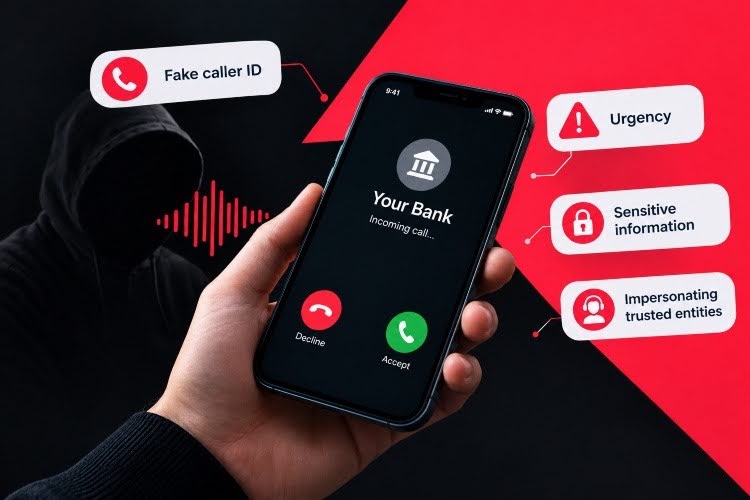
- Caller ID spoofing. The number you see on the screen looks real—it even matches your bank’s number—because the attacker has forged it.
- A sense of urgency. They alert you to a suspicious charge, an account freeze, or a held package. The goal is to make you act out of fear rather than calmly.
- Request for information or codes. They ask you to “confirm” your identity by providing an SMS code, your PIN, or saying “yes” out loud—information that can later be used to access your accounts, just like an infostealer that compromised your device.
- Quick hang-up. Before you can verify anything through another channel, the call ends and the damage is already done.
What has changed in recent years is the technical sophistication. Voice cloning using artificial intelligence now makes it possible to imitate the voice of a family member or an executive with just a few seconds of audio—something that sounded like science fiction a few years ago but is now a real threat to businesses and individuals alike.
You might be interested in:> SIM Swapping: What It Is, How It Works, and How to Avoid This Scam in 2026
Examples of vishing currently circulating
Here are some of the most common examples of vishing reported in Spain:
| Call Type | What they say | What they're looking for |
| Fake Bank Security Department | “We’ve detected suspicious activity in your account” | SMS code or online banking password |
| Fake technical support | “Your computer has a virus; we need remote access” | Install remote control software |
| Fake Tax Agency | “You have a pending tax refund—please confirm your information” | Bank and personal information |
| Voice-Based CEO Fraud | “I’m the CEO; I need an urgent wire transfer” | Payment authorization from an employee |
| Fake telephone operator | “We’re going to upgrade your plan—please confirm the code you receive” | Fraudulent number porting |
This last scenario is particularly dangerous because, if the scammer manages to port your number, they can intercept the verification codes from your banking apps.
How to Spot a Vishing Attack Before It’s Too Late
There are signs that are almost always present, although sometimes it's hard to see them in the heat of the moment:
- They contact you unexpectedly and in a hurry, leaving you no time to think.
- They ask for information that the real organization would never ask for over the phone, such as your full PIN or an SMS code.
- They insist that you don’t hang up and call that number yourself to “verify” that it’s legitimate: that’s exactly the opposite of what you should do.
- The caller ID matches your bank’s actual number—but that’s no longer a guarantee of anything, since caller ID spoofing is commonplace.
An important note: the classic advice to “hang up and call the number you have saved” is still valid, but only if you manually dial the number from your own phone—never call back or press any buttons the scammer suggests.
How to Avoid Vishing
Preventing vishing doesn't depend on having more technology, but on changing a few habits:
- Never give out verification codes over the phone. No legitimate organization asks for them that way.
- Hang up and verify through another channel. Contact your bank through the official app or the phone number listed on your documents—not the one that called you.
- Be wary of any sense of urgency. Almost any real problem can wait ten minutes while you verify the information.
- Install a call blocker that uses a database of numbers reported as fraudulent.
- If you run a business, train your team. Voice-based CEO fraud has grown because many employees don't know it exists.
If you’ve already provided any sensitive information, act quickly: block your cards or access through your bank’s app, change your passwords, and file a report with the police or the Civil Guard. The sooner you act, the less time the scammer has to use that information.
Vishing in the Business World: Continuous Monitoring vs. Exposure
For a company, even one employee falling victim to vishing can open the door to a credential leak, CEO fraud, or unauthorized access to internal systems. One-time training is no longer enough; you must know at all times what data, credentials, or references about the organization are circulating externally, because many vishing campaigns are built using information from previous data breaches or exposed corporate profiles.
This is precisely what Continuous Threat Exposure Management (CTEM) is—a cyber-surveillance approach that continuously monitors what information about your company, your employees, or your suppliers is accessible to a potential attacker before they can use it.
Kartos, Enthec's cybersecurity monitoring solution, applies this CTEM model to businesses, detecting leaked credentials, data exposure, and attack surfaces that are later exploited in targeted vishing campaigns.
Frequently Asked Questions About Vishing
Is vishing the same as phishing?
No. Phishing occurs via email or a link, while vishing occurs via a phone call. Both aim to steal data or money, but they use different channels and different manipulation techniques.
Can the bank refund my money if I fall victim to a vishing scam?
It depends on the specific case. If someone accessed your account without your consent, PSD2 regulations require the bank to refund the amount. If you authorized the transaction under false pretenses, the process is more complicated, although Spanish courts are increasingly ruling in favor of victims.
How do I know if a call from my bank is real?
Hang up and call the official number listed on your card or in the app yourself. Never use the number that called you or the one the caller suggests.
Are small businesses also targets of vishing?
Yes, in fact, they are a common target precisely because they tend to have fewer verification protocols than large corporations, and a single transfer authorized by mistake can result in a significant loss.
Digital Supply Chain Risk: Why Your Supplier's Security Breach Could Be Your Problem
Your company may have the best firewall on the market and still suffer a data breach without anyone ever having accessed your network. All it takes is for one of your vendors to have exposed credentials or a misconfigured server.
This is, in essence, the risk of the digital supply chain—that is, the exposure you inherit from every application, cloud service, or integration you connect to your business, even if you don’t manage it directly.
What exactly is digital supply chain risk?
When we talk about digital supply chain risk, we're referring to the vulnerabilities that enter your organization through third parties such as the invoicing software your finance department uses, the CRM where you upload customer data, or the logistics provider that has access to your ERP. Each of these points is a gateway that you don’t control, but for which you are held accountable.
This isn't a new problem, but in the past, a company typically had five or six critical suppliers. Today, with software as a service, APIs, and outsourcing, the list easily exceeds a hundred, and a large portion of it isn't even tracked.
Why a Supplier's Shortfall Becomes Your Problem
Here’s the nuance that many companies overlook: legally—and in the eyes of your customers—it almost never matters who made the mistake, but rather who is ultimately responsible for the data. And we’re not just talking about a financial penalty, but also the reputational damage that will follow the company.
According to an analysis by Cipher (Supply Chain Attacks: 2025 Analysis and 2026 Trends), by 2025, 22.5% of all reported security breaches involved a supplier or third party—twice as many as the previous year. And yet, most organizations continue to assess their cybersecurity solely from the inside.
The Most Common Blind Spots in Your Supply Chain
Most third-party security breaches result from oversights that build up over time and that no one stops to review:
- Subdomains and Forgotten Assets: test environments or old websites that are still active and unpatched.
- Leaked credentials: employee or vendor passwords circulating on the deep web following a third-party breach.
- Unreviewed third-party access: integrations and permissions granted once and never audited.
- Shadow IT: applications that a team procures without going through the IT department.
- Mentions on underground forums: Information about your company circulating on the dark web without your knowledge.
Any of these points can become the source of an incident if no one monitors them constantly.
From the Annual Audit to the CTEM Approach
For years, the standard response to this risk was one-time on an ad hoc basis or vendor audit once a year. The problem is that months can pass between reviews, during which the attack surface can change completely.
| Focus | Frequency | What it detects | Main limitation |
| Annual Audit
|
On time, once a year | Snapshot of the security status | Outdated within weeks |
| Periodic Penetration Testing
|
Every 6–12 months | Known technical vulnerabilities | Does not cover third parties or new assets |
| CTEM (Continuous Threat Exposure Management)
|
Continuous | Actual exposure, compromised credentials, forgotten assets, vendor risk | Requires a specialized tool |
CTEM (Continuous Threat Exposure Management) is based on a different concept: cybersecurity isn’t a test you pass once a year; it’s a process that must be monitored every day. Instead of waiting for the next audit, the goal is to have constant visibility into what is at risk, where, and how urgently action is needed.
This is where Enthec comes in, with its cyber-surveillance solutions designed specifically for this approach. Kartos, its enterprise platform, continuously monitors an organization’s exposed digital footprint and that of its critical suppliers. It detects leaked credentials, forgotten domains, and mentions on underground forums before they turn into an incident.
For those who manage their own exhibitions as professionals or freelancers, Enthec also offers Qondar, designed to monitor digital identity on an individual level.
What Your Company Can Do Starting Today
There's no need for a radical change overnight, but it's a good idea to start moving in this direction:
- Take a real inventory of your critical suppliers and what data or access each one has.
- Ask those vendors what security controls they implement and whether they are willing to share that information.
- Replace one-time reviews with continuous monitoring of your company’s and your value chain’s exposure.
- Prioritize based on impact, because not all suppliers require the same level of scrutiny.
Frequently Asked Questions
What is the difference between third-party risk and digital supply chain risk?
Third-party risk focuses on each individual supplier—their controls, certifications, track record, and so on. Digital supply chain risk is broader; it encompasses the entire network of technological dependencies through which an incident can spread.
How is the risk of a digital supplier measured?
It combines public information—such as exposed domains, leaked credentials, or reputation—with security questionnaires and, when possible, continuous monitoring of its exposure surface using cyber-surveillance tools.
Does CTEM replace penetration testing?
No, it complements it. Penetration testing remains useful for testing specific controls at a given time. The CTEM provides continuous monitoring between those one-off tests.
What size of company needs to monitor its digital supply chain?
Any company that relies on external suppliers to operate—which, these days, is practically any company with an online presence, regardless of its size.
If you want to know how much exposure your company and your critical suppliers have today, you can request a Kartos demo and see firsthand what it finds in your digital landscape.

How can your credit card data be stolen?
Spain is the third-most-affected European country for stolen credit cards sold on the dark web. According to a 2025 NordVPN study, Spanish users' banking data sells for an average of $11.68 per card, usually in bundles, suggesting the volume of compromised cards circulating in illegal markets. Meanwhile, in February 2026, Spanish banks and the OCU (Spanish Consumers' Organization) issued alerts after detecting a wave of fraudulent charges of just a few cents, designed to test whether a card is working before the final theft.
Knowing how your card details are stolen and what they do with them afterward is the first step to avoid becoming a victim.
Theft of credit card data in non-face-to-face transactions
In recent years, EMV systems have been implemented to prevent the physical cloning of credit cards. EMV is a payment method based on a technical standard for smart payment cards, payment terminals, and ATMs that can accept them. EMV stands for "Europay, Mastercard, and Visa," the three companies that created the standard.
That's why credit card vulnerabilities are more common during card-not-present (CNP) transactions.
How can they steal your credit card information? Most common forms
Cybercriminals use a variety of techniques to obtain your card details in both physical and digital environments. These are the most widespread methods currently used:
Phishing, smishing, and vishing
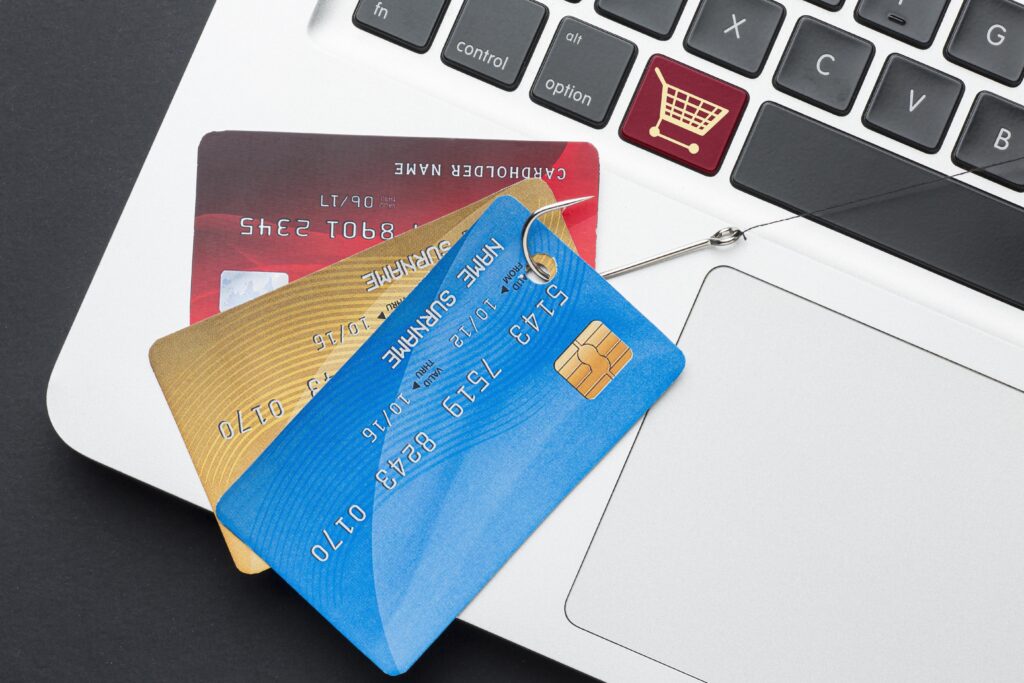
Phishing is the most common method. The attacker impersonates your bank, a courier company, or a payment platform (Amazon, PayPal, BBVA, CaixaBank, etc.) and sends you an email or SMS with a link to a fake website where you unknowingly enter your card details.
- Smishing: The same technique is used via SMS. You often see messages like, "Your package is being held, please enter your details to release it."
- Vishing: Phone call. The "fake bank technician" scam involves someone who detects a suspicious purchase and asks you to confirm details to cancel it.
In all cases, the objective is the same: for you to voluntarily enter the card number, expiry date, and CVV.
Web skimming (formjacking)
Web skimming, also known as formjacking, involves injecting malicious JavaScript code into the payment page of a legitimate online store. The code is completely invisible to both the user and the merchant. It captures card details as soon as they are entered and sends them to the attacker's server.
Skimming and shimming on ATMs and data phones
Although EMV (chip) systems drastically reduced classic skimming, criminals have evolved:
- Skimming: Installation of a physical device over the card reader of an ATM or point-of-sale terminal that copies the magnetic stripe. Modern models incorporate Bluetooth transmission to extract data remotely.
- Shimming: The most recent and difficult-to-detect variant involves criminals inserting an ultra-thin electronic strip (shim) into the card reader slot. This shim intercepts communication between the card's EMV chip and the terminal, allowing them to read enough data to create fraudulent magnetic stripe cards.
Corporate data breaches
When criminals attack a company that stores payment data, they can obtain thousands or millions of card records in one fell swoop. These breaches are especially profitable for attackers and are the primary source of leaked credit card information sold on the dark web.
Data stolen in corporate security breaches can take months to appear on illegal markets. This prevents users from linking the leak to a specific incident.
Public WiFi networks and man-in-the-middle attacks
When you connect to an unencrypted public Wi-Fi network (airport, coffee shop, hotel) and make a purchase, an attacker on the same network can intercept the communication and capture your card details. This technique, known as a man-in-the-middle attack, is less common today thanks to HTTPS, but it remains an active vector in poorly configured networks.
Malware and spyware on devices
Malicious apps or infected downloads can install a keylogger or spyware that records everything you type, including your card details when making online purchases.
| Technique | Environment | How it works | Warning sign |
| Phishing / smishing | Online / Mobile | Email or SMS with a link to a fake bank website | Suspicious URL, urgency in the message |
| Vishing | Telephone | A call from "your bank" asking for details | No bank asks for the CVV over the phone. |
| Web skimming | Online stores | Malicious code in the payment form | Difficult to detect as a user |
| Physical skimming | ATMs and POS terminals | Device superimposed on the reader | Reader with loose or strange parts |
| Shimming | ATMs and POS terminals | Foil in the EMV chip slot | Almost impossible to detect with the naked eye |
| Data leak | Companies | Database breach in a business | Unknown charges weeks later |
| Public WiFi | Open Networks | Interception of the unencrypted connection | Password-free Wi-Fi in public places |
| Malware / keylogger | Own device | Malicious app or download records keystrokes | Strange device behavior |
How are credit cards cloned?
Card cloning is the process by which criminals create a physical or virtual copy of your card using stolen data to make fraudulent purchases.
There are two main types:
- Physical cloning: Using data obtained from the magnetic stripe via skimming, criminals encode a blank card with that information. This allows it to be used in stores that still accept magnetic stripe cards (increasingly less common in Europe, but still common in some Latin American countries or for in-person purchases with outdated terminals).
- Virtual cloning (carding): Using the card's full details (number, expiration date, and CVV), criminals can make online purchases directly, without needing to manufacture any physical object. This has been the dominant method in Spain since the widespread adoption of the EMV chip.
The entire carding process operates like an industrial chain: some criminals steal the data, others validate it by making micropayments of cents to verify that the card is active, and a third group exploits it until the available credit is exhausted.
What can they do with your card details?
Once your card details are in the hands of attackers, the most common uses are:
| Fraudulent use | Description |
| Direct online purchases | They place orders in online stores on behalf of third parties or with an anonymous shipping address |
| Selling on the dark web | They sell the data in packages to other criminals at an average price of €10 per card in Spain |
| Carding (test micropayments) | They make minimal charges (€0.50–€1) to verify that the card works before operating. |
| Creation of cloned physical cards | Using magnetic stripe data, they manufacture cards for use in chip-free POS terminals |
| Identity fraud | They combine your card details with other personal information to impersonate you. |
| Fraudulent transfers or tricks | In some cases, they can access online banking if they also have the login credentials. |
My credit card was hacked: signs to detect it and what to do
If you suspect your credit card has been hacked, or that your data is part of a credit card leak, the signs often appear sooner than you think, although almost no one associates them with fraud until the damage is already visible.
These are the most frequent signs that indicate your card details may have been compromised:
- Unknown charges on your statement, especially micropayments of cents (a classic sign of carding).
- Notifications from your bank for purchases you did not make, even if you had the card at all times.
- Failed attempts to access your online banking from unknown devices or locations.
- You receive purchase confirmations for orders you didn't place. Sometimes on platforms you don't even know exist.
- Your card is declined for a routine purchase for no apparent reason (this may indicate the bank blocked it due to suspicious activity detected before you).
- Your bank details appear in a data breach alert, such as those issued by Qondar when it detects your credentials on the dark web.
Practical rule: Review your card transactions at least once a week. The sooner you identify a fraudulent charge, the easier it is to recover your money and the less damage it can do.
What to do if your card details have been stolen?
If you detect unauthorized charges or suspect that your data has been compromised, act in this order:
- Call your bank immediately to block or cancel the card. Most have a 24-hour helpline. Do it even if you're not sure; it's free and reversible.
- Document fraudulent charges with screenshots of the statement before the bank removes them from the visible history.
- File a complaint with the National Police or the Civil Guard. This is necessary for the bank to process the refund and for the police investigation to move forward.
- Request a chargeback from your bank. In cases of card fraud, European regulations (PSD2) require banks to return the amount immediately in most cases, except in cases of serious cardholder negligence.
- Check if your data is circulating on other platforms using monitoring tools like Qondar. Credit card data breaches often expose other personal data as well.
- Change the passwords on the platforms where you saved that card. (Amazon, PayPal, plataformas de streaming...).
How to protect your credit card data: a practical guide 2026
Online shopping
- Only buy from websites with HTTPS and recognized trust seals.
- Use single-use virtual cards for purchases at stores you don't know.
- Activate real-time notifications from your bank for every charge.
- Avoid saving your card details on platforms if you don't use them regularly.
- Never make purchases while connected to a public WiFi network without a VPN.
At ATMs and card payment terminals
- Visually inspect the reader before inserting the card. If it has loose parts, play, or anything stuck to it, do not use it.
- Prefer contactless (NFC) payment to push notifications whenever possible: it eliminates the risk of shimming.
- Cover the keypad with your hand when entering the PIN, even if you don't see any cameras.
- Preferably use ATMs located in bank offices or large establishments.
On your device and email
- Do not click on links in SMS messages or emails that ask you to confirm bank details, even if the sender appears to be your bank. Always access your account through the official app or by typing the URL directly.
- Keep your operating system and applications updated to close malware vulnerabilities.
- Activate two-factor authentication (2FA) on your online banking.
Continuous monitoring
Reactive protection has its limits; you act only after you know something has happened. Continuous monitoring of your data on the dark web, like that offered by Qondar, allows you to detect a breach before it can be exploited.
Learn more about personal privacy and how to protect it.
Qondar: Continuous monitoring of your banking data on the web and the dark web
Most credit card fraud goes undetected until the damage is already done. The problem is that weeks or months can pass between when your data is leaked and when a criminal uses it.
Qondar, Enthec's personal cyber-surveillance platform, solves exactly this problem. It automatically and continuously monitors whether your card details, such as the number, expiration date, and combinations with your email or phone number, appear in leaked databases, carding forums, dark web marketplaces, or any other source of exposure.
When it detects that your data is being transmitted, it alerts you in real time. So you can cancel the card, notify the bank, and block any use before the impact becomes greater.
You don't need technical knowledge. Qondar works in the background, like a permanent alarm system for your identity and digital assets.
Frequently Asked Questions
How can they steal my card details without taking the card from me?
Through digital techniques such as phishing (fake websites that impersonate your bank), web skimming (malicious code in online stores), or malware on your device. They can also use physical devices installed on ATMs (skimming and shimming) that capture data when you insert your card.
What is a leaked credit card?
A leaked credit card is one whose data criminals have illegally obtained and sold or distributed on dark web marketplaces or carding forums. In 2025, Spain was the third European country with the most leaked credit cards circulating on these markets.
How are credit cards cloned?
Through skimming (devices on ATMs that read the magnetic stripe) or shimming (sheets that intercept the EMV chip), criminals obtain data to manufacture counterfeit physical cards. In online environments, virtual cloning uses the card number, expiration date, and CVV to make purchases without needing a physical card.
How can I tell if my debit or credit card has been hacked?
The clearest signs are unfamiliar charges on your statement, purchase confirmations you didn't make, or your card being declined for no apparent reason. You may also receive alerts from your bank or tools like Qondar if your data appears in a data breach.
What can they do with my card details?
They primarily use them to make fraudulent online purchases, sell them on the dark web to other criminals, or create cloned physical cards. In some cases, they also combine them with other personal data to impersonate you with your bank.
Will the bank refund my money if my card has been hacked?
In most cases, yes, as long as you report it promptly and you were not grossly negligent. European regulations such as PSD2 require banks to refund the amount immediately in cases of card fraud.
Is it the same if my physical card is stolen as if my data is stolen?
No. If your physical card is stolen, the bank blocks it and issues a new one. If someone steals your data (number, expiration date, CVV) without you losing the card, you may keep using it without knowing it's compromised, while criminals use it online. That's why early detection is crucial.
How can I prevent my card details from being leaked?
Use single-use virtual cards for online purchases, activate real-time notifications, avoid entering data on websites without HTTPS, physically inspect ATMs before using them, and use continuous monitoring tools like Qondar to see whether your data has appeared in any data breaches.
What is doxing: Definition, risks, and how to protect yourself
The Internet is a space where we share information daily. Social networks, forms, online purchases… Each action leaves a slight digital trace. Most of the time, we are unaware of how much we reveal about ourselves. This is where an increasingly well-known and feared concept comes into play: doxing.
What is doxing, and why should you care?
Doxing (short for dropping dox or "dropping documents") is the practice of collecting and publishing a person's personal information without their consentwith the aim of exposing, intimidating, or harming them. This may include her full name, address, phone number, email address, place of work, private photos, family information, and even financial data.
What distinguishes doxing from a simple Google search is the intention: the doxer gathers scattered information from multiple sources such as social networks, leaked databases, public records, the dark web… to build a detailed profile of a person and use it against them.
These types of attacks, which initially emerged in very specific online communities, have spread in recent years and can have serious consequences: from harassment, threats, and identity theft… up to and including job loss or legal problems.
Doxing on the internet is not just a simple hacking game. It is a form of digital violence classified in Spain and many other countries with penalties that can reach up to four years in prison.
Qondar: Personal cyber-surveillance to know when you're being doxed before it's too late
Before continuing, it is worth stopping at our featured tool: Qondar, a solution for personal cyber surveillance.
Qondar has been developed for anyone who wants to maintain control over their information on the network without needing advanced technical knowledge. It works like a Continuous Threat Exposure Management (CTEM) platform. It lets you detect if your data is being shared without permission in forums, leaked databases, social networks, or even the dark web.
Even if you don't know what doxing on the internet is, you may still suffer an attack. If so, Qondar will tell you before it's too late.
Why does someone decide to dox another person?
There is no single attacker profile or motivation. Doxing, as this phenomenon is also known, can have many faces:
- Personal revenge: Ex-partners, ex-friends, or work conflicts can lead to malicious leaks.
- Extreme ideology or activism: Some users publish data about opponents to intimidate or silence them in political or social debates.
- Practical jokes or viral challenges: especially among teenagers or in toxic online communities.
- Extortion and blackmail: Once they have your data, some attackers try to obtain money or favors in exchange for not disclosing it.
- Coordinated harassment. Organized groups (sometimes called hate brigades) simultaneously attack the same person, especially journalists, activists, or public figures.
- Professional cybercrime. Personal information such as DOB, address, and phone number is sold on specialized forums to facilitate identity fraud.
Whatever the reason, the result is the same: your privacy and security are compromised.
What type of data is typically exposed when doxing?
Although the degree of exposure varies, the most common data that is published or sold in doxing cases are:
- Full name and physical address
- Phone number
- Profiles on social networks (including anonymous accounts linked to the person)
- Personal photos
- Information about the family environment
- Employment or academic data
- Purchases, searches, donations, or affiliations
A simple cross-referencing of leaked databases, like those circulating on the dark web, can be enough to build a complete profile in minutes. That's why prevention is more effective than reaction.
Bonus: Where is doxed data published? Primarily on platforms like Doxbin (accessible from the open web, with nearly 200,000 registrations), dark web forums, Telegram channels, and, in cases of coordinated harassment, directly on social networks like X or Reddit.
How to avoid being doxed: good practices to protect your privacy
To know how to protect yourself from doxing involves changing certain digital habits.. Here are some practical tips that you can start applying today, now that you understand what doxing is:
-
Audit your digital footprint regularly
Enter your first and last name into search engines and see what comes up. Also search for combinations with your email address, phone number, and most-used username. If you find data that shouldn't be public, request its removal by exercising your right to be forgotten through your national Data Protection Agency.
Tools like Qondar automate this process by monitoring any new occurrences in your data in real time and notifying you immediately.
-
Review the privacy settings of your social media accounts
- Activate private profiles on Instagram, TikTok, and Facebook.
- Check what information is public on LinkedIn (date of birth, phone number, location).
- Delete or limit your Facebook posting history.
- Do not post documents, plane tickets, or photos that show your address or car registration.
You might be interested in→ 5 social media security strategies.
-
Use strong, unique passwords and enable 2FA
- Do not reuse passwords across multiple services.
- Enable two-step authentication (2FA) whenever possible.
Learn how to manage passwords properly.
-
Beware of online forms and contests
- Do you really need to give your phone number to enter that raffle?
- Use secondary or temporary email addresses whenever possible.
-
Protect your anonymity in public debates and forums
Many doxing victims are targeted precisely because of their opinions expressed online. If you participate in polarized debates, avoid using the same username on multiple platforms and don't post unnecessary personal details.
-
Protect your immediate surroundings
Doxing often involves information about family members. Talk to people in your life about what information they post that could locate you (mentions of your workplace, photos taken at your home, geolocation of joint posts).
-
Continuously monitor with specialized tools
Manual protection has its limits. Continuous monitoring solutions like Qondar allow you to detect exposures in real time, including the appearance of your data on the dark web or in leaked databases, before the damage becomes irreversible.
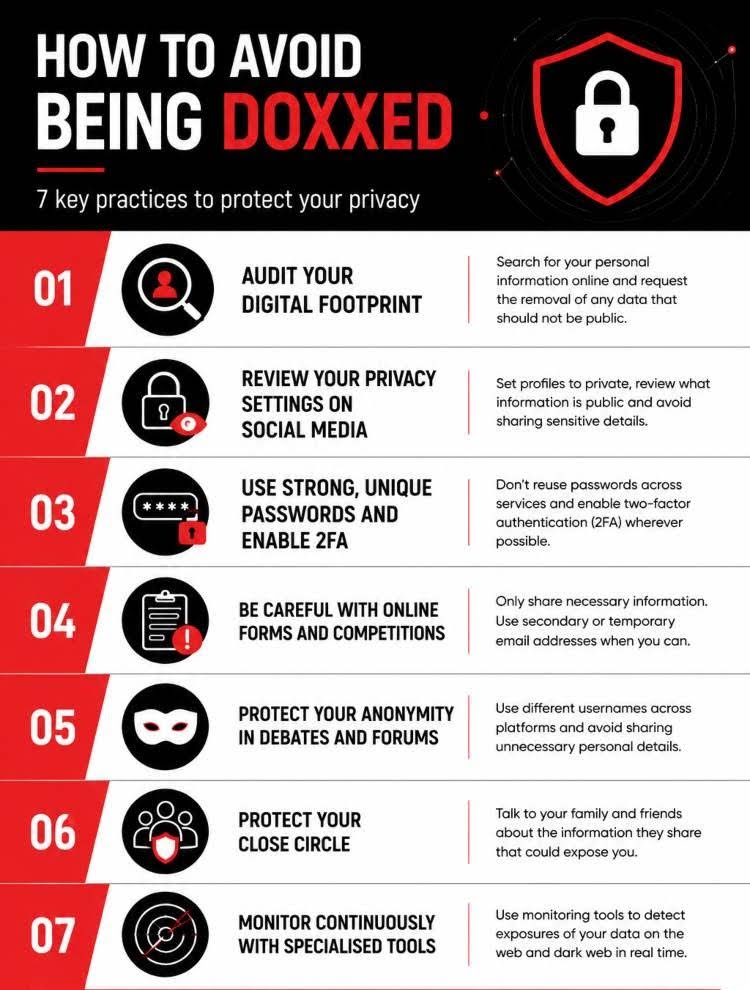
What do you do if you have been doxed?
If you're already a victim of doxing, act quickly. Every hour counts.
- Document everything before requesting withdrawals. Take screenshots of all published content, including URLs.
- Contact the platforms where the information has been published. Use the content removal forms from Google, Meta, X, and any other involved platforms.
- Report it to the National Security Authorities, especially if there are threats, blackmail, or sexual content. Doxing can be classified as discovery and disclosure of secrets, harassment, or threats.
- Contact your national Data Protection Agency if your data protection rights have been violated. In 2025, the Spanish AEPD imposed a record 40 million euros in sanctions, reflecting its growing activity in defense of citizens.
- Inform those around you so that they are alert to possible attempts at social engineering using your information.
- Seek psychological support if the emotional impact is intense. Cyberbullying can cause anxiety, post-traumatic stress, and social isolation.
Is there any definitive protection against doxing?
There is no 100% foolproof barrier. But you can drastically minimize your exposure and be prepared to act before the damage becomes serious.
The key lies in early detection. On the internet, published data is indexed, copied, and distributed within minutes. What takes hours to publish can take years to disappear. That's why continuous and proactive monitoring of your digital identity is the most effective measure available today.
This is precisely what Qondar does: to continuously and automatically monitor whether your information appears where it shouldn't, and alert you in real time so you can take action. No technical knowledge required. No interruptions to your daily routine.
Now that you know what doxing is, it's clear that it's not a problem exclusive to celebrities or public figures. In a world where identity theft on social media is growing year after year, protecting your personal information is crucial.
Your privacy is part of your security. Start protecting it today.
Frequently Asked Questions
What does it mean to dox someone?
Doxing someone means collecting and publishing that person's personal information (name, address, phone number, workplace, etc.) without their consent, with the aim of exposing, intimidating, or harming them.
Is it a crime to dox someone?
Yes. Although most penal codes around the world do not use the term "doxing," the practice can be classified as disclosure of secrets, harassment, or threats, with penalties of up to four years in prison. It can also lead to sanctions for violations of the Data Protection Acts and the Data Protection Regulations.
How do I know if I'm being doxed?
The most common signs are receiving threatening messages from strangers, noticing that people you don't know know details of your private life, or finding posts with your personal information on forums or social networks.
Tools like Qondar allow you to detect it proactively, before the effects are visible.
How to avoid being doxed?
The most effective measures are to audit your digital footprint regularly, properly configure privacy settings on social networks, use unique passwords with 2FA, be cautious with the data you provide in forms, and use continuous monitoring solutions like Qondar.
What do I do if someone has published my personal data without my permission?
Document everything with screenshots, request the removal of the content from the platform and Google through the right to be forgotten, report it to the Security Authorities, and go to the Data Protection Agency if your data protection rights have been violated.