If one day you try to log in to your email and your password no longer works, or you receive a login notification from a country you’ve never been to, you may have been the victim of an account takeover—in other words, someone has taken control of something that belongs to you without your permission.
This is no minor issue. Fraud related to account theft and takeover results in combined losses of more than billions of euros each year for individuals and businesses. And the trend, far from improving, continues to worsen.
What exactly is account hijacking?
Account hijacking, also known as account takeover, is the process by which an unauthorized third party gains access to and control over someone else’s digital account. This could be an email account, a social media account, a banking platform, a subscription service, or any other platform where you have saved login credentials.
Once inside, the attacker can do virtually anything, such as read your private messages, carry out financial transactions, impersonate you to your contacts, sell access to the account on the black market, or use it as a point of entry to compromise other related systems.
What makes this type of attack particularly dangerous is that, in many cases, the victim doesn’t realize it right away. The intrusion may go unnoticed for days or weeks before the damage becomes apparent.
How Account Hijacking Occurs
There are several ways attackers can gain control of someone else’s account. Knowing what they are is the first step to avoiding them.
Data Breaches and Exposed Credentials
One of the most common causes. When a company experiences a security breach, your users’ credentials (email addresses and passwords) may end up being posted on forums or sold on the dark web. If you reuse the same password across multiple services, a single data breach can compromise several of your accounts at once.
Credential stuffing attacks
This method takes advantage of precisely that. Attackers use lists of leaked credentials and automatically test them on hundreds of different platforms. If the username and password match on any of them, they gain access without having to hack anything.
Phishing and Direct Deception
Fake emails, messages, or websites that impersonate legitimate services remain a highly effective entry point. The goal is simple: to get you to enter your information into a form that is actually sending that information directly to the attacker.
To learn more, check out our post:> Phishing: What It Is and How Many Types There Are.
Malware and Spyware
Some malicious programs install themselves on the victim’s device and capture keystrokes, passwords saved in the browser, or session cookies—all without the user noticing anything unusual.
Social engineering.
Sometimes no technical sophistication is needed to carry out a social engineering attack. A call from someone posing as technical support, an urgent “account verification” message, or a seemingly harmless conversation can be enough to trick someone into voluntarily handing over their credentials.
Signs That Your Account May Have Been Compromised
There isn’t always a clear warning. However, there are Signs You Shouldn’t Ignore:
- Login notifications from unknown locations or devices.
- Changes to your profile information that you didn’t make.
- Messages sent from your account that you don’t remember writing.
- Unable to log in because the password or recovery email address has been changed.
- Transactions you don’t recognize.
- Contacts who tell you they’ve received strange messages from you.
If you notice any of these symptoms, take action immediately.
What to Do If Someone Has Taken Control of Your Account
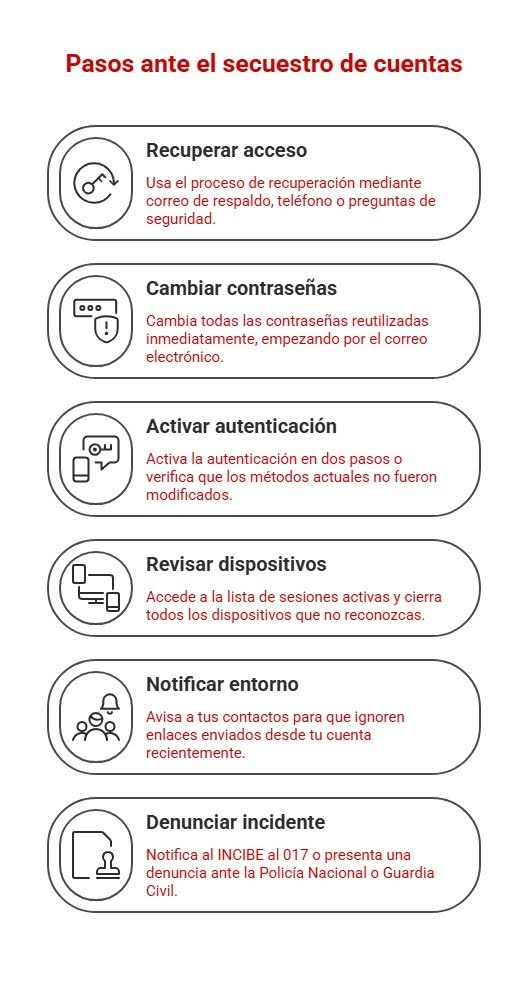
1. Try to regain access as soon as possible
Most platforms have an account recovery process that uses a backup email address, phone number, or security questions. Use it right away.
2. Change the related passwords
If you’ve reused that same password on other services, change them all immediately. Start with your email account, which is usually the master key to all your other accounts.
You might be interested in:> How to manage business passwords and credentials easily and securely to avoid online threats
3. Enable two-step verification
If you hadn’t enabled it before, do so now. And if you already had it enabled, check to make sure that your verification methods are still the same and haven’t been changed.
4. Check the devices with active access
Many apps and websites let you view active devices and sessions. Close any that you don’t recognize.
5. Let the people around you know
If the attacker has been able to send messages or emails from your account, notify your contacts so they don’t click on any links they’ve received from you in the last few days.
6. Report the incident
In Spain, you can report it to the National Cybersecurity Institute (INCIBE) via its cybersecurity helpline (017) or file a report with the National Police or the Civil Guard.
How to Prevent Account Hijacking
Prevention remains the best strategy. Some basic measures are very effective:
- Use unique and strong passwords for each service. A password manager can help you manage them.
- Enable multi-factor authentication for all services that support it.
- Keep your devices up to date and protected with anti-malware solutions.
- Be wary of emails or messages that ask you to verify your credentials immediately.
- Check periodically to see if your data has appeared in any known data breaches.
This last point is more important than it seems. Knowing that your credentials are exposed before the attacker uses them it gives you time to act.
Continuous monitoring as an additional layer of protection
For both individuals and businesses, having a solution that continuously monitors the exposure of credentials on the web, the dark web, and other intelligence sources provides a real advantage against account hijacking.
We have been working in this field since Enthec, using two tools for Continuous Threat Exposure Management. Kartos, designed to protect organizations, and Qondar, designed for individuals. Both tools allow you to detect in real time whether a person’s or a company’s data has been exposed, so you can take action before any damage occurs.
Because one of the problems with account takeover is precisely that: by the time you realize what has happened, the attacker has already been in for hours or days.
Do you want to know if your credentials—or your organization’s—are currently exposed? Find out how Enthec can help you stay in control of your digital footprint before others do it for you.